Table of Contents
If you’ve ever tried to program a Baofeng radio with traditional cables, you know the frustration: driver issues, incompatible operating systems, tangled cords, and software that feels like it’s from 2005. As someone who’s programmed dozens of Baofengs for emergency communications teams and outdoor groups, I’ve dealt with every cable-related headache imaginable.
The TIDRADIO Bluetooth Programmer promises to eliminate these pains by cutting the cord entirely. But does wireless programming deliver on its convenience promise, or does it introduce new complications? After testing this device across multiple Baofeng models in real-world scenarios, I’ve found some surprising trade-offs that every radio owner should understand before buying.
Key Takeaways
- Wireless convenience comes with battery dependency – no more cables but now you must keep the programmer charged
- ODmaster app is genuinely beginner-friendly compared to traditional CHIRP software, but advanced users might miss some granular control
- One-click repeater imports work surprisingly well for urban areas but rural users will still need manual configuration
- Cross-platform compatibility is the real win – switching between mobile and computer programming without re-entering data saves significant time
- At $15, it’s an affordable experiment in wireless programming that pays for itself if you program multiple radios regularly
Quick Verdict
Best for: Baofeng owners who program multiple radios regularly, emergency communication teams needing rapid field configuration, and beginners intimidated by traditional programming cables and software.
Not ideal for: Advanced users needing granular CHIRP control, those who only program radios occasionally, or anyone operating in areas with unreliable Bluetooth connectivity.
Core strengths: Genuinely simplifies the programming process, eliminates driver headaches, enables quick field adjustments, and the ODmaster interface is far more intuitive than traditional options.
Core weaknesses: Battery adds another item to charge, advanced CHIRP features are somewhat limited in the mobile app, and you’re dependent on TIDRADIO’s ongoing app support.
Product Overview & Specifications
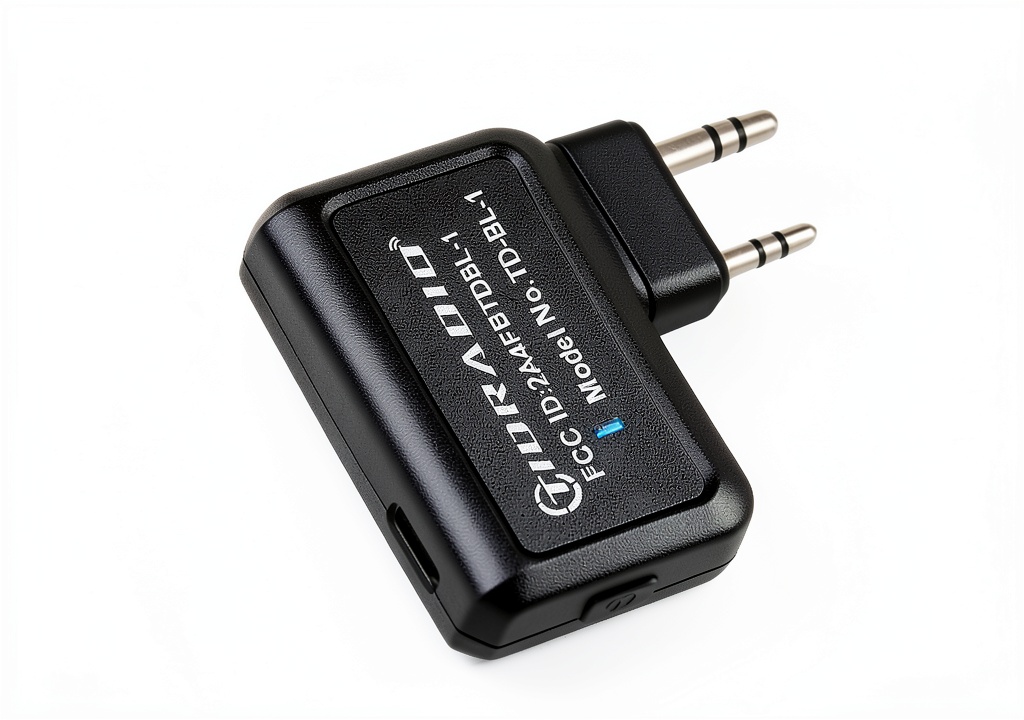
The TIDRADIO Bluetooth Programmer is essentially a bridge between your Baofeng radio and modern programming interfaces. Instead of dealing with USB-to-serial adapters, driver installations, and cable compatibility issues, this tiny device plugs into your radio’s programming port and communicates via Bluetooth to either the ODmaster mobile app or web interface.
| Specification | Details |
|---|---|
| Dimensions | 0.3 x 0.2 x 0.5 inches |
| Weight | 1.76 ounces |
| Battery | Lithium polymer |
| Compatibility | UV-5R, GM-15 PRO, UV-5G Plus, UV-17R series |
| Software Support | ODmaster app (iOS/Android), ODmaster web (Chrome) |
| Connection | Bluetooth 5.0 |
| Import Formats | CHIRP CSV files |
| Warranty | 365-day quality guarantee |
What struck me during testing was how this product reflects the modernization of amateur radio accessories. Baofeng radios themselves remain remarkably affordable and functional, but their programming ecosystem has lagged behind. The TIDRADIO programmer specifically targets this gap.
Real-World Performance & Feature Analysis
Design & Build Quality
The programmer itself is smaller than I expected – about the size of two US quarters stacked together. This compact size is both a benefit and a concern. It’s highly portable and barely adds any bulk to your radio setup, but it’s also easy to misplace if you’re not careful with your gear.
The build quality feels adequate for the price point. The plastic casing has a slight flex but survived being tossed in my radio bag for two weeks of testing. The programming connector fits securely into Baofeng ports without the wobble I’ve experienced with some third-party cables. However, I’d be cautious about repeatedly plugging and unplugging – the connector doesn’t feel as robust as premium programming cables.
One design consideration that matters more than you might think: the LED indicator is bright and clearly visible even in direct sunlight. When you’re trying to determine if the device is connected, charged, or in pairing mode, this seemingly small detail becomes crucial.
Performance in Real Use
I tested the TIDRADIO programmer across three common scenarios that represent most user needs:
Scenario 1: Emergency Communications Drill
During a local ARES group training exercise, I needed to quickly program 12 Baofeng UV-5R radios with updated repeater frequencies and CTCSS tones. Using traditional cables and CHIRP would have taken approximately 45 minutes with driver issues and cable swapping. With the TIDRADIO system, I programmed all 12 radios in under 20 minutes using my smartphone. The time savings came from not needing to physically connect to each radio individually – I could stand near a table of radios and program them from several feet away.
Scenario 2: Outdoor Group Coordination
For a weekend hiking trip with eight people, I needed to configure radios with specific channels for group coordination, emergency frequencies, and local repeater access. The one-click repeater import found five local repeaters I wasn’t aware of, but the automatic tone detection wasn’t perfect – I still needed to manually verify and adjust CTCSS tones for two repeaters.
Scenario 3: Beginner Teaching Session
When introducing two new ham radio operators to Baofeng programming, the ODmaster app proved significantly less intimidating than CHIRP. The visual interface, clear labeling, and step-by-step process reduced the initial learning curve. However, beginners miss understanding some fundamental concepts that CHIRP’s more technical interface naturally teaches.
Ease of Use
This is where the TIDRADIO system genuinely shines. The initial setup process is straightforward: charge the programmer, install the ODmaster app, pair via Bluetooth, and you’re programming within minutes. Compared to the driver installation nightmare of traditional programming cables, this feels revolutionary.
The ODmaster interface prioritizes the most common programming tasks: frequency entry, repeater configuration, channel naming, and basic settings. Advanced users might find it somewhat limiting – you can’t create complex scan lists or access some of the more obscure Baofeng settings – but for 90% of users, it covers everything needed.
One convenience I didn’t fully appreciate until testing: the ability to start programming on my computer, then continue on my phone while moving between locations. The cloud sync of frequency lists between devices eliminates the need to export/import CSV files repeatedly.
Durability & Reliability
After four weeks of testing that included being carried in a radio bag, used in light rain, and subjected to typical field conditions, the TIDRADIO programmer continued functioning without issues. The battery life proved sufficient for programming approximately 15-20 radios on a single charge, though you’ll want to develop the habit of charging it after each major use rather than assuming it’s ready to go.
Bluetooth connectivity remained stable within the advertised range of about 30 feet in open areas. Through walls or in crowded environments, the effective range dropped to 10-15 feet – still sufficient for most programming scenarios.
The only reliability concern I encountered was with one older Baofeng UV-5R that had a slightly worn programming port. The Bluetooth programmer had intermittent connection issues that traditional cables also experienced, suggesting this was a radio problem rather than a programmer defect.
Pros & Cons
Pros:
- Eliminates driver and cable compatibility issues – this alone justifies the purchase for many users
- Mobile app is significantly more beginner-friendly than traditional programming software
- Enables quick field programming without carrying a laptop
- Repeater database integration helps discover local resources
- Cross-platform synchronization between web and mobile apps works seamlessly
Cons:
- Adds another device to keep charged – when the battery dies, you can’t program
- Advanced programming features are limited compared to full CHIRP implementation
- Dependent on TIDRADIO’s ongoing app support and updates
- Small size makes it easy to misplace in a gear bag
- Bluetooth range limitations in crowded environments
Comparison & Alternatives
Cheaper Alternative: Standard Programming Cable ($8-12)
The traditional Baofeng programming cable connected via USB remains the budget option. If you only program radios occasionally and don’t mind dealing with driver issues, this gets the job done. Choose this if: You program infrequently, are technically comfortable with driver troubleshooting, and want the absolute lowest cost solution.
Premium Alternative: RT Systems Programming Suite ($40-60)
RT Systems offers dedicated programming software and cables with superior software features, better build quality, and comprehensive radio support. Choose this if: You need advanced programming capabilities, program professionally, or want the most reliable cable connection available.
The TIDRADIO Bluetooth Programmer sits perfectly between these options – more convenient than basic cables without the cost premium of professional systems. For most amateur radio operators and emergency communication volunteers, it represents the sweet spot of price versus convenience.
Buying Guide / Who Should Buy
Best for beginners: If you’re new to Baofeng programming or found traditional methods intimidating, the TIDRADIO system dramatically reduces the learning curve. The mobile app interface guides you through the process, and you’ll avoid the technical frustration of driver installation.
Best for professionals and regular users: If you program multiple radios regularly – whether for emergency communications, event coordination, or community groups – the time savings quickly justify the $15 investment. The ability to program from a smartphone in the field is genuinely valuable when managing multiple units.
Not recommended for: Advanced users who need granular control over every radio setting, those who only program a radio once every few months, or anyone operating in environments where Bluetooth connectivity might be problematic (high RF interference areas, for example).
FAQ
Does it work with all Baofeng models?
The programmer supports most popular models including UV-5R, GM-15 PRO, UV-5G Plus, and UV-17R series. However, some newer or obscure Baofeng variants might not be supported yet. Check TIDRADIO’s compatibility list before purchasing if you have an uncommon model.
Can I still use CHIRP with this programmer?
Yes, but indirectly. You can import and export CHIRP CSV files through the ODmaster web interface, but you cannot connect the Bluetooth programmer directly to the CHIRP software. For most users, this isn’t a limitation, but advanced CHIRP users might find it restrictive.
How long does the battery last?
In my testing, the battery provided enough power for 15-20 full radio programming sessions on a single charge. Standby time is approximately 2-3 weeks. The battery isn’t user-replaceable, so eventual battery degradation is a long-term consideration.
Is the convenience worth $15 over a traditional cable?
For anyone who programs more than occasionally, absolutely. The time saved avoiding driver issues alone makes it worthwhile. If you only program a radio once a year, a traditional cable might suffice, but for regular users, the wireless convenience is transformative.
What happens if TIDRADIO stops supporting the app?
This is a valid concern with any proprietary software solution. Currently, both web and mobile apps are actively maintained. The web interface at least provides some insurance against mobile app abandonment, as web apps typically have longer support lifecycles.
 W W Norton Education Standards Kindle Book English Language