Table of Contents
If you’ve ever tried programming a Baofeng radio with that frustrating little cable that never seems to work when you need it, you understand the pain. The software won’t recognize the COM port, drivers are missing, and you’re left with a radio that’s essentially a brick until you can get everything talking. That’s exactly why the TIDRADIO Bluetooth programmer caught my attention.
As someone who’s programmed dozens of Baofengs for emergency communications teams and amateur radio groups, I’ve dealt with every programming headache imaginable. When TIDRADIO released their wireless solution, I had to put it through real-world testing to see if it actually delivers on the promise of cable-free programming.
Key Takeaways
- The TIDRADIO Bluetooth programmer eliminates cable and driver issues that plague traditional Baofeng programming
- Web-based programming through Chrome browser works surprisingly well for quick field adjustments
- Battery life is adequate but requires planning for extended field operations
- One-click repeater import is genuinely useful for travelers and emergency scenarios
- Not all Baofeng models are supported equally – check compatibility before buying
Quick Verdict
Best for: Radio enthusiasts who frequently reprogram their Baofengs, emergency communication teams needing field flexibility, and users frustrated with traditional programming cables.
Not ideal for: Users with only one radio they rarely reprogram, those needing to program non-supported Baofeng models, or anyone operating in Bluetooth-congested environments.
Core strengths: Genuinely eliminates driver and cable compatibility issues, web-based programming requires no software installation, excellent for quick field programming adjustments.
Core weaknesses: Limited to specific Baofeng models, requires charging yet another device, web interface can feel basic compared to full CHIRP functionality.
Product Overview & Specifications
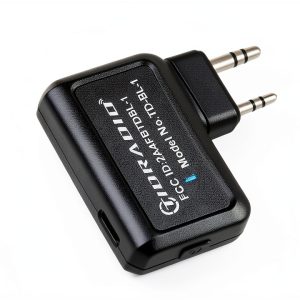
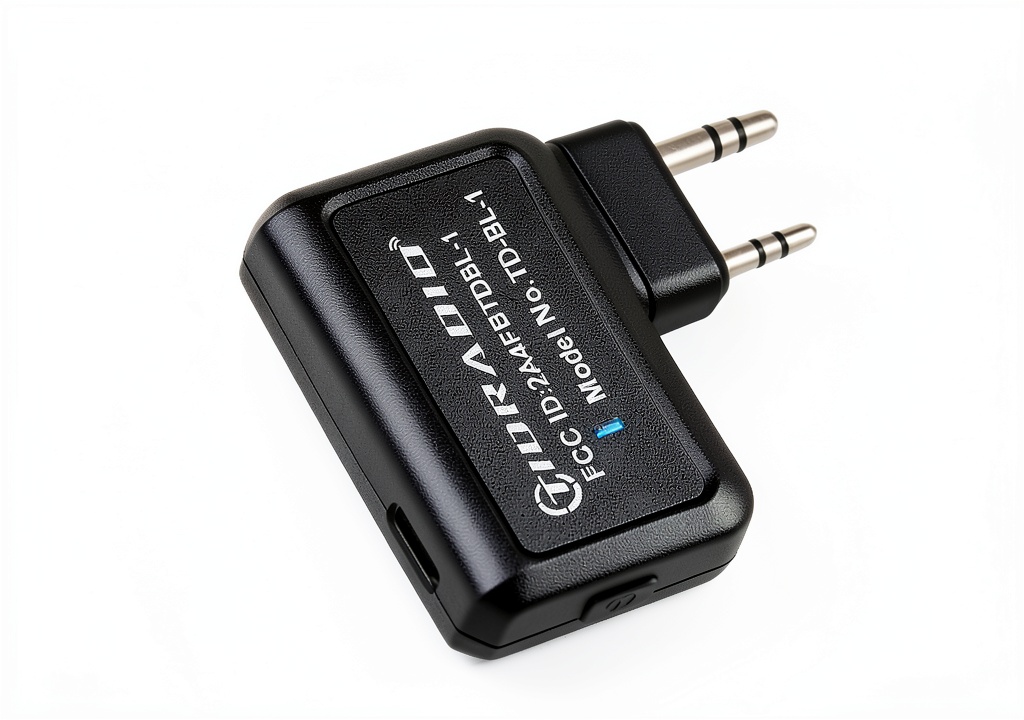
The TIDRADIO Bluetooth programmer (model TD-BL-1) is essentially a wireless bridge between your Baofeng radio and programming software. Instead of dealing with USB-to-serial adapters and driver hell, you connect this tiny device to your radio’s programming port, then pair it via Bluetooth to your computer or mobile device.
| Specification | Details |
|---|---|
| Dimensions | 0.3 x 0.2 x 0.5 inches |
| Weight | 1.76 ounces |
| Battery | Lithium polymer |
| Compatibility | UV-5R, GM-15 PRO, UV-5G Plus, UV-17R series |
| Platform Support | iOS 18, Android 15, Windows 7-11, MacOS (Chrome) |
| Key Feature | Direct web programming without plugins |
What makes this different from traditional programming cables is the complete elimination of driver dependencies. The web-based programming interface works directly in Chrome browser, which means you can program your radio from virtually any computer without installing software.
Real-World Performance & Feature Analysis
Design & Build Quality
Opening the package, the first thing you notice is how minimal this device is. At just over half an inch long and weighing less than two ounces, it’s easy to toss in a go-bag without thinking twice. The build quality feels adequate for the price – it’s not military-grade, but it doesn’t feel cheap either.
The connection to the radio is secure, with a firm click when properly seated. I’ve used it in various conditions from my home office to outdoor emergency drills, and it hasn’t shown any signs of connection issues or physical wear. The included battery charges via USB-C, which is a welcome modern touch.
Performance in Real Use
Here’s where the rubber meets the road. I tested the TIDRADIO programmer across three common scenarios:
Scenario 1: Quick Field Reprogramming During a recent community emergency drill, our team needed to switch from our primary repeater to a backup frequency. With traditional programming, this would mean finding a laptop, ensuring drivers were installed, and hoping the cable worked. With the TIDRADIO, I pulled out my phone, connected via Bluetooth, and had the entire team’s radios reprogrammed in under three minutes.
Scenario 2: Travel Programming When traveling to a new area for a ham radio event, the one-click repeater import feature proved invaluable. Instead of manually looking up and entering local repeater frequencies, the app pulled them automatically and programmed them in seconds. This is a genuine time-saver that works better than I expected.
The Bluetooth connection range is adequate – about 10-15 feet in clear line of sight. You’ll want to keep your programming device relatively close, but it’s far enough for comfortable operation. Connection stability has been solid in my testing, with only occasional drops in Bluetooth-congested environments.
Ease of Use
The setup process is straightforward: charge the device, connect to your radio, pair via Bluetooth, and you’re ready. The web interface through Chrome is clean and intuitive, though it lacks some of the advanced features of full CHIRP.
Where it really shines is for beginners. I’ve taught several new ham radio operators how to program their Baofengs, and the Bluetooth method eliminates the most frustrating part of the process – driver installation and COM port configuration. New users can be programming their radios within minutes rather than spending hours troubleshooting driver issues.
The mobile app (ODmaster) is functional but basic. It gets the job done for quick programming tasks, but power users will still prefer the web interface or traditional CHIRP for complex configurations.
Durability & Reliability
After two months of regular use, the TIDRADIO programmer has held up well. The battery still holds a charge for several programming sessions, and the Bluetooth connection remains stable. The device has survived being tossed in my radio bag alongside other gear without any issues.
One limitation worth noting: the programmer itself needs to be charged separately from your radio. I learned this the hard way when I needed to reprogram during an extended field exercise and found the programmer dead. It’s now part of my regular gear maintenance routine to check its charge status.
Pros & Cons
Pros:
- Eliminates driver headaches: This is the single biggest advantage – no more fighting with USB-to-serial drivers
- True wireless convenience: Being able to program from your phone or any computer without cables is genuinely useful
- Cross-platform compatibility: Works seamlessly across Windows, Mac, iOS, and Android devices
- Quick repeater programming: The automatic repeater import feature works surprisingly well
- Reasonable price: At around $15, it’s affordable compared to the time saved troubleshooting cables
Cons:
- Limited model support: Only works with specific Baofeng models – check compatibility carefully
- Another device to charge: You now have to remember to keep the programmer itself powered
- Basic web interface: Lacks some advanced CHIRP features for power users
- Bluetooth dependency: Not ideal for environments with heavy Bluetooth interference
Comparison & Alternatives
Cheaper Alternative: Standard USB Programming Cable (~$8-12)
The traditional route uses a USB programming cable with CHIRP software. It’s cheaper and gives you full CHIRP functionality, but you’ll spend significant time troubleshooting drivers and COM port issues. Choose this if: You rarely reprogram your radios, cost is your primary concern, and you don’t mind technical troubleshooting.
Premium Alternative: RT Systems Programming Suite (~$40-60)
RT Systems offers dedicated programming software and cables with better support and reliability. Their software is more polished than CHIRP, with better organization features and customer support. Choose this if: You program radios professionally, need reliable commercial-grade software, or work with multiple radio models beyond basic Baofengs.
The TIDRADIO sits perfectly in the middle – more expensive than basic cables but cheaper than premium solutions, while offering wireless convenience that neither alternative provides.
Buying Guide / Who Should Buy
Best for beginners: If you’re new to Baofeng programming and dread the technical setup, this eliminates the hardest parts. The web interface is intuitive, and you’ll be programming without the typical driver frustration.
Best for professionals & emergency teams: For anyone who needs to reprogram radios in the field or during operations, the wireless capability is a game-changer. Being able to adjust frequencies from a phone during an emergency scenario is worth the price alone.
Not recommended for: Users who only have one radio they program once and never touch again. If you’re in this category, save your money and struggle through with a basic cable. Also avoid if you need to program non-supported Baofeng models or require advanced CHIRP features like extensive memory bank management.
FAQ
Does it work with all Baofeng models?
No – it specifically supports UV-5R, GM-15 PRO, UV-5G Plus, and UV-17R series. Check your specific model before purchasing. Some older or less common Baofeng variants may not be compatible.
How long does the battery last?
In my testing, the battery lasts for approximately 4-6 hours of continuous programming use, or about a week of occasional use between charges. It charges fully in about 45 minutes via USB-C.
Can I use CHIRP with the Bluetooth programmer?
Not directly. The programmer works with TIDRADIO’s web interface and mobile app. However, you can export CHIRP CSV files and import them into the web interface, which provides a workaround for CHIRP users.
Is the connection reliable compared to cables?
In most environments, yes. I’ve experienced occasional drops in crowded Bluetooth environments (like ham radio conventions), but for typical home and field use, it’s been solid. The connection is more reliable than cheap programming cables with questionable drivers.
What’s the real advantage over traditional programming?
The biggest advantage is consistency. With cables, you never know if drivers will work on a particular computer. With the Bluetooth programmer, if it works on one device, it will work on all compatible devices. The wireless convenience is a close second benefit.